How to Calculate Wind Correction Angle — Rule of Thumb for IFR Pilots

Tobias Maihoff
March 16, 2026
Wind correction angles (WCA) are fundamental to IFR flying. Every time you track a radial, fly an approach, or hold, you need to correct for wind. While your FMS handles this in the flight levels, instrument students and GA pilots need to do it in their heads — fast.
This guide covers the rule of thumb method that lets you calculate WCA without a calculator, plus worked examples for inbound tracking and holding patterns.
The Formula
The wind correction angle formula is straightforward:
WCA = Crosswind Component ÷ (TAS ÷ 60)
That's it. Three steps:
- Find the crosswind component (CWC)
- Divide your TAS by 60 (giving you roughly your groundspeed per minute in nautical miles)
- Divide CWC by that number — the result is your WCA in degrees
The trick is step 1: finding the crosswind component without a calculator. That's where the sine rule of thumb comes in.
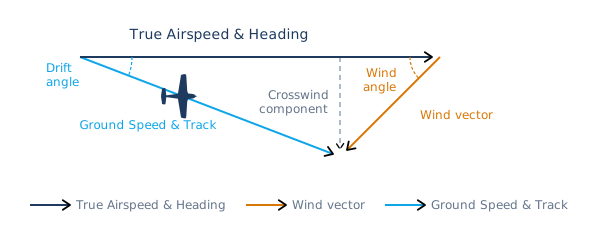 The wind triangle — heading, wind, and ground track vectors with drift and wind angles.
The Sine Rule of Thumb
To get the crosswind component, you need:
CWC = Wind Speed × sin(Wind Angle)
The wind angle is the difference between your heading and the wind direction. The sine of that angle tells you what fraction of the wind is hitting you from the side.
Instead of reaching for a calculator, use this approximation:
The Rule
For angles between 20° and 80°:
sin(angle) ≈ (angle ÷ 100) + 0.2
For the edges (0°, 10°, 90°), just memorize the values from the table below.
Sine Values Table
| Angle | Rule of Thumb | Exact Value | Error |
|---|---|---|---|
| 0° | 0.0 | 0.000 | 0.000 |
| 10° | 0.2 | 0.174 | +0.026 |
| 20° | 0.4 | 0.342 | +0.058 |
| 30° | 0.5 | 0.500 | 0.000 |
| 40° | 0.6 | 0.643 | −0.043 |
| 50° | 0.7 | 0.766 | −0.066 |
| 60° | 0.8 | 0.866 | −0.066 |
| 70° | 0.9 | 0.940 | −0.040 |
| 80° | 1.0 | 0.985 | +0.015 |
| 90° | 1.0 | 1.000 | 0.000 |
The maximum error is about 0.07 — close enough for mental math at 3,000 feet in turbulence.
Nice to know: The largest difference between the rule of thumb and the exact sine value occurs at 55°, where the rule gives 0.75 vs. the exact 0.819 — an absolute error of 0.069 or about 8.4%. In practice, that's less than 3 knots off on a 40-knot crosswind.
Chart: Rule of Thumb vs. Exact Sine
The blue line shows the rule of thumb values, the grey line shows the exact sine curve. They track closely enough that the approximation works well for aviation purposes.
Step-by-Step: The Full WCA Calculation
Let's put it all together with a concrete example.
Given
- Heading: 090°
- Wind: 150° at 30 kt
- TAS: 120 kt
Step 1 — Wind Angle
Calculate the angle between your heading and the wind direction:
Wind Angle = 150° − 090° = 60°
The wind is coming from the right, so the correction will be into the wind (to the right).
Step 2 — Sine of the Wind Angle
Using our rule of thumb:
sin(60°) ≈ (60 ÷ 100) + 0.2 = 0.8
Step 3 — Crosswind Component
CWC = 30 kt × 0.8 = 24 kt
Step 4 — Wind Correction Angle
WCA = 24 ÷ (120 ÷ 60) = 24 ÷ 2 = 12°
Correct 12° to the right: fly heading 102° to track 090°.
For comparison, the exact WCA using precise trigonometry would be 12.5° — our mental math got us within half a degree.
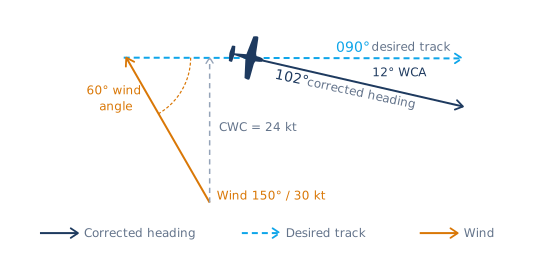 Visualized example — track 090°, wind 150°/30 kt → 12° WCA, corrected heading 102°.
Example 1: Inbound on a Radial
You're tracking inbound on the 270 radial to a VOR (so your desired track is 090°). The wind is 200° at 25 kt, TAS is 100 kt.
Calculation
-
Wind Angle: 200° − 090° = 110°. Since this is greater than 90°, use 180° − 110° = 70° (the sine is the same, but the wind is now from the right and behind you).
-
sin(70°): Using the rule → (70 ÷ 100) + 0.2 = 0.9
-
CWC: 25 × 0.9 = 23 kt (round to 23)
-
WCA: 23 ÷ (100 ÷ 60) ≈ 23 ÷ 2 = 12° (rounding 1.67 to 2)
The wind is from the right, so correct right: fly heading 102° to track 090° inbound.
For normal tracking inbound, you apply the WCA once — just crab into the wind and the CDI stays centered.
 Step-by-step WCA calculation in IFR Flight Simulator — the app walks through the same steps we just covered.
Here's what that looks like in practice — notice the 12° difference between heading and course on the navigation display as the aircraft tracks inbound to the station:
 Tracking inbound on radial 270 with a 12° wind correction in IFR Flight Simulator.
Example 2: Outbound in a Holding Pattern (Triple Correction)
This is where it gets interesting. When flying the outbound leg of a holding, you need to apply the WCA three times — a factor of 3. Here's why:
Why 3×?
In a standard hold, you need to compensate for wind drift during three phases:
- The outbound turn — wind pushes you off track during the 180° turn from inbound to outbound
- The outbound leg — wind pushes you off the outbound track for one minute
- The inbound turn — wind pushes you off track during the 180° turn from outbound to inbound
The goal: after the inbound turn, you want to roll out on an intercept that brings you back to the inbound track. The convention is to apply 3× WCA on the outbound heading to account for all three phases at once.
 Flight path trace of a holding pattern in crosswind — the 3× outbound correction compensates for drift during all three phases.
Worked Example
You're holding on the 360 radial, inbound course 180°. Wind is 270° at 20 kt, TAS is 120 kt. Right-hand turns (standard).
Inbound Leg
- Wind Angle: 270° − 180° = 90°
- sin(90°): = 1.0
- CWC: 20 × 1.0 = 20 kt
- WCA: 20 ÷ (120 ÷ 60) = 20 ÷ 2 = 10°
Wind is from the left on the inbound leg, so correct left: inbound heading = 170°.
Outbound Leg (3× Correction)
The outbound track is 360°. The WCA is the same 10° (same crosswind, opposite direction — now the wind pushes from the right).
Apply the triple correction:
Outbound WCA = 10° × 3 = 30°
Wind is from the right on the outbound leg, so correct right: outbound heading = 360° + 30° = 030°.
This 30° correction compensates for drift during the outbound turn, the outbound leg itself, and the inbound turn — so you roll out of the inbound turn roughly on the inbound course.
 Flying the holding with 3× WCA applied — wind drift visible throughout the pattern in IFR Flight Simulator.
In Practice
The triple correction is a starting point. After the first circuit, observe how well you're tracking and adjust. Most instructors teach:
- First circuit: Apply 3× WCA outbound, 1× inbound
- Subsequent circuits: Fine-tune based on what the CDI and timing tell you
Example 3: Wind Correction During Holding Entries
The 3× rule applies once you're established in the hold — but what about the entry itself? Whether you're flying a parallel, teardrop, or direct entry, the outbound leg of the entry gets a different correction: 2× WCA.
During a holding entry, you're flying two wind-affected phases before you're back on the inbound track:
- The outbound leg of the entry — wind pushes you off track for roughly one minute, just like a normal outbound leg. That's 1× WCA.
- The inbound turn — the 180° turn back toward the fix exposes you to drift again. That's another 1× WCA.
Combined, that gives you 2× WCA on the outbound heading of your entry. Unlike the full hold (where you also compensate for the outbound turn), the entry only has one turn to account for — you're coming straight from the fix, not rolling out of an inbound-to-outbound turn.
Once you complete the entry and begin your first full circuit, switch to the standard 3× outbound / 1× inbound corrections.
Parallel holding entry with wind correction applied — flight path and drift visible in IFR Flight Simulator.
Quick Reference
| Scenario | WCA Factor |
|---|---|
| Tracking inbound on a radial | 1× |
| Tracking outbound on a radial | 1× |
| Holding entry (parallel, teardrop, direct) | 2× |
| Outbound leg of a holding pattern | 3× |
Practice Makes Permanent
The rule of thumb is simple, but speed comes from repetition. You need to be able to run through these steps in seconds, not minutes — especially when you're also managing altitude, timing, and radio calls.
IFR Flight Simulator lets you practice wind correction angles in realistic scenarios — holdings, intercepts, and approaches at real-world airports — so the mental math becomes second nature before you spend money in the sim or airplane.
 Practicing wind correction angles for a holding pattern in IFR Flight Simulator.
Summary
WCA Quick Reference
Wind Correction Angle
Crosswind Component
Sine Rule of Thumb
For 20°–80°. Memorize: sin(10°) ≈ 0.2, sin(90°) = 1.0
Holding Corrections
Practice until it's reflexive — then trust your corrections and fly the airplane.
Written by Tobias Maihoff — airline pilot and software engineer. I built IFR Flight Simulator because I believe IFR training doesn't have to be as painful or expensive as it often is. With the right preparation, student pilots can walk into every sim session and checkride confident and ready. That's what I'm trying to make easier.

Tobias Maihoff
March 16, 2026